
4 Easy Ways to Create a Sociogram

Today, we’ll be looking at 4 Ways to create a Sociogram using tools such as Microsoft Excel, PowerPoint, Microsoft Word, etc. Do not worry if you don’t know what a sociogram is or, what is the use of it, as we’ll be starting entirely from scratch and only then moving on to building the sociograms. There will also be a section where we discuss how to read and interpret a Sociogram Report
Table of Contents
What is a Sociogram?
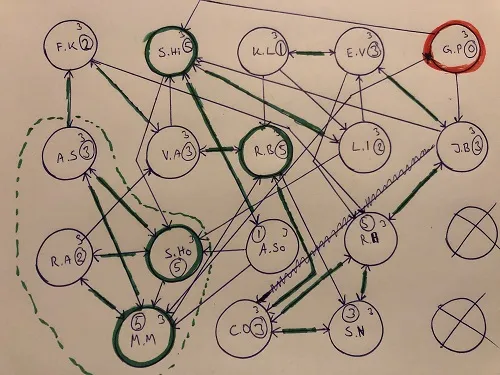
A sociogram is a Map / Flowchart like structure that represents the Social Connections that people in a group have. This group can be anything from Students in a class to Teams in an office.
Interestingly, that’s where the name Sociogram comes from – Socio + Gram where gram is a word of Latin origin that means “representing in a drawing”
Sociograms are used to understand the relationship among people in a group clearly. This helps us in knowing if everyone in a team/class is satisfied and ensuring that no one feels left out in the group.
However, this wasn’t the original purpose of developing Sociograms, the inventor of Sociograms – Jacob L. Moreno was a psychiatrist who developed sociograms to understand the social life of his patients better and also to practice group therapy
If you’re coming from a CS Background, a good analogy for Sociograms would be to think of them as Directional Graphs where each Node represents a Person and the Directional Edges represent connections between these Nodes / People.
Important Terms in a Sociogram

Before going ahead and building the sociogram, it’s important to understand a few terms related to it
Connections
Most sociograms tend to have Directional Connections meaning that if Person A thinks of Person B as a friend that doesn’t necessarily mean Person B also considers Person A as a friend.
The two types of Directional Connections are Incoming Connections and Outgoing Connections
Incoming Connections
They are people who consider the current person as a friend. For eg, if Person A has 3 Incoming Connections that means 3 people in the sociogram consider Person A as a friend.
Outgoing Connections
They are people that the current person considers a friend.
For eg, if Person A has 2 outgoing friends that means only Person A considers these 2 people as friends, and the reverse need not be true
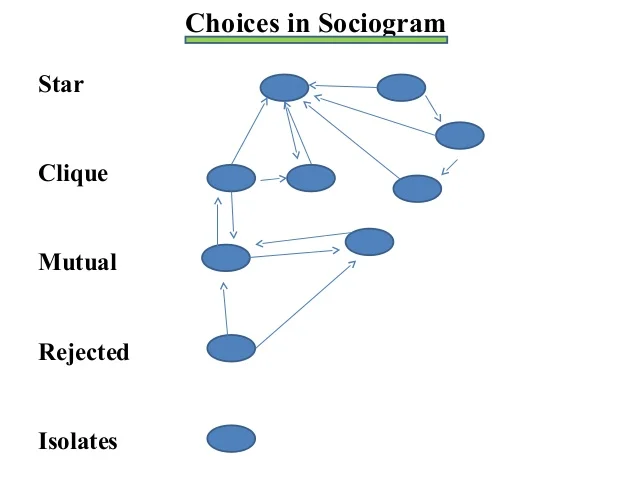
Isolates
You might have observed in real-life situations or friend circles that there are always a few people who feel left out and are not connected with their group. These people are called Isolates.
A more formal definition of Isolates is – “People Having No Incoming Connections” or “People whose incoming connections are also Isolates”
Cliques
These refer to a Tightly formed group of people within a larger group. This can also be understood by relating to real-life situations. You must have seen a friend circle of 3-4 people ( short group ) within a larger group ( class )
To put it formally “ Cliques are a small group of people inside a larger group who are completely connected “
Here being completely connected refers to having both incoming and outgoing connections from each member of the clique
Stars
Almost any group has a few popular people that are well-liked by a large number of people.
To put it simply, Stars are the popular people in a Sociogram group
More formally, “Stars are the people having most incoming connections in a Sociogram”
Collecting Data for a Sociogram
Now that we are done discussing the theory of Sociogram, it’s time to move on and work on creating a Sociogram
To get a better feel of the Sociogram that we’re building, you can start by collecting data from people you already know. This way you can draw some really interesting insights about your friends/colleagues
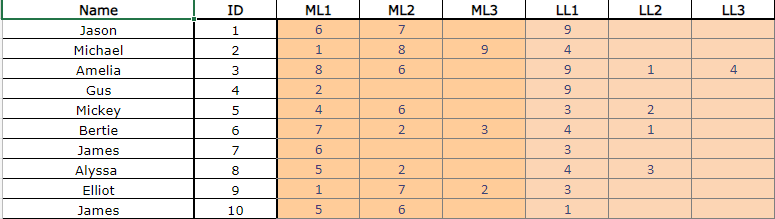
To keep things simple, we will collect the data in the following format
| Person Name | Person ID | Most Liked 1 | Most Liked 2 | Most Liked 3 | Least Liked 1 | Least Liked 2 | Least Liked 3 |
| Jason | 1 | 6 | 7 | – | 9 | .. | .. |
| Michael | 2 | .. | .. | .. | .. | ||
| Amelia | 3 | …. | … | .. | … | …. |
In the above table, any person being surveyed can choose up to 3 most liked people and up to 3 least liked people. However, fields can be left blank if the person doesn’t have exactly 3 people in mind.
If you do not have any data or are not interested in surveying your friends/colleagues, here are some sample survey data you can work with
Creating Sociogram in Microsoft Excel
After collecting the data, it’s finally time to use it for creating a Sociogram. Thankfully, there’s already a Special Excel Sheet made by Robin Banerjee that automatically makes a sociogram based on an Excel Table. And fortunately, the table format used in this excel sheet is similar to the one we used while collecting data
To get started, download the Robin Banerjee Sociogram Excel Tool using the following link: http://www.rhydlewis.eu/resources/sociogram.xlsm
Download the Excel Sheet above and open it using Microsoft Excel
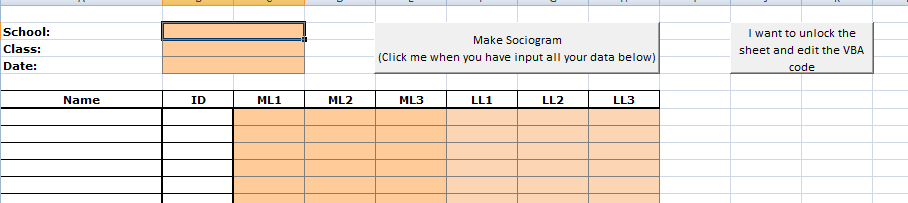
In the above sheet, you will find the same table that we used while collecting data. After filling up the data, the sheet should look something like this
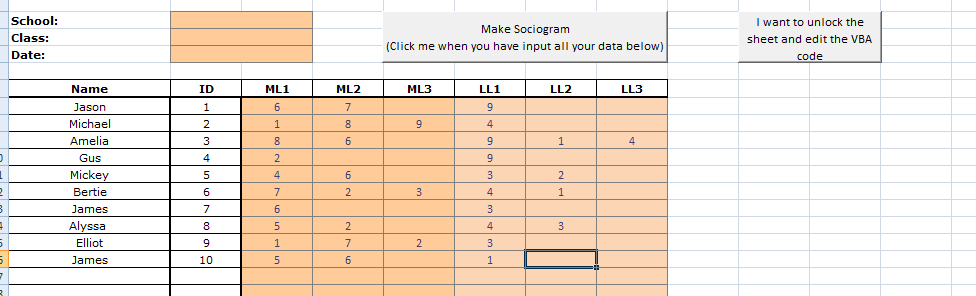
You might also notice two buttons on the top right corner of this excel sheet, they are nothing but Excel Form Actions. But we don’t need to get too deep into this since, for our purposes, the Make Sociogram button should create a sociogram inside this Excel Spreadsheet
Try it out by pressing the Make Sociogram button and if everything went alright you should see a sociogram like the one shown below
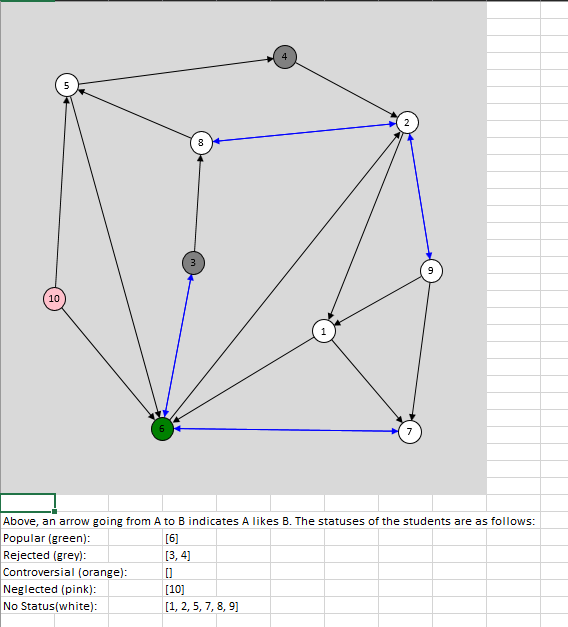
The above-created sociogram not only has an arrow graph, but also a helpful description in which people are divided into sections based on their status. However, don’t worry about Interpreting the sociogram just yet, as we’ll be focusing on that at a later point in this article
Creating Sociograms on Powerpoint & Word
This method is useful when you want to create Custom Sociograms on Microsoft Powerpoint and Word. Here, instead of putting in the data in a Table and then converting the table to a Sociogram, we manually generate Boxes & Arrows to create the sociogram.
This method might not be useful if you already have tons of data collected in a table format and have no special requirement for a Custom Sociogram
The process is almost the same for both Microsoft Powerpoint and Microsoft Word so to keep things simple, we’ll be only working on creating a sociogram on Microsoft Word
To get started,
- Create a new Microsoft Word document and head to the Insert -> Shapes section
- You will see a list of available shapes & lines as shown below
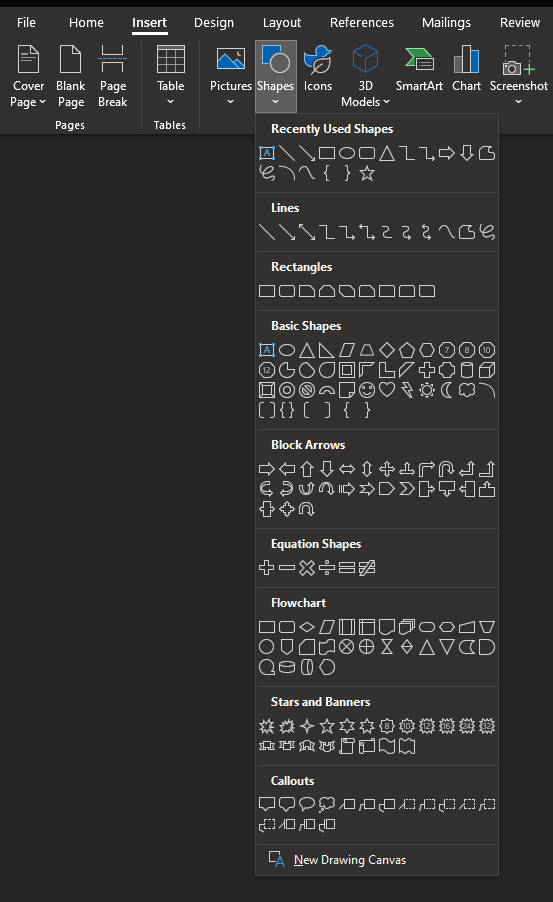
- To build a sociogram, we’ll only need to work with the Arrow Line and a Rectangle or Square shape
Let’s try to create a simple sociogram using the above Shapes & Lines

After creating a sociogram in word, your result should look something like the one shown above. You might have also noticed that it takes a long time to create a good sociogram in word because most of the things are being done manually.
Therefore, this method is only recommended when you want to get creative with your sociogram and are not willing to utilize the automated solutions available.
Creating Sociograms on the Web
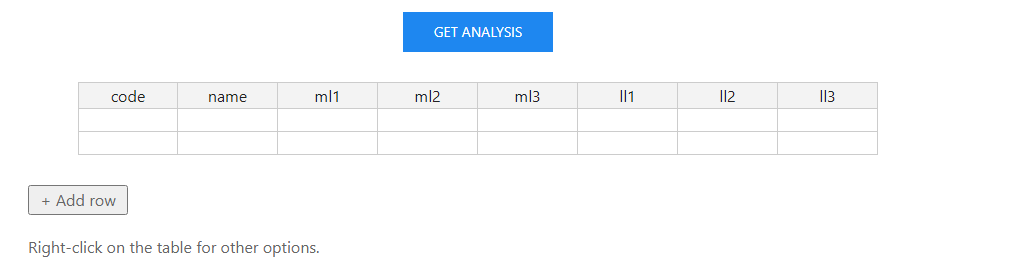
Let’s say you want to create a sociogram on the go and do not have time to mess around with the tools above, then there’s a web tool just for that.
Using this tool you can simply enter the sociogram data and after a couple of button clicks, you will have your sociogram generated as an Exportable Image which you can use/share wherever you want to.
Tool Link: https://wwwnewdev.sussex.ac.uk/psychology/cress/expt/sociogram/
Let’s try out the above tool by inserting the table data that we collected previously in the Collecting Data section
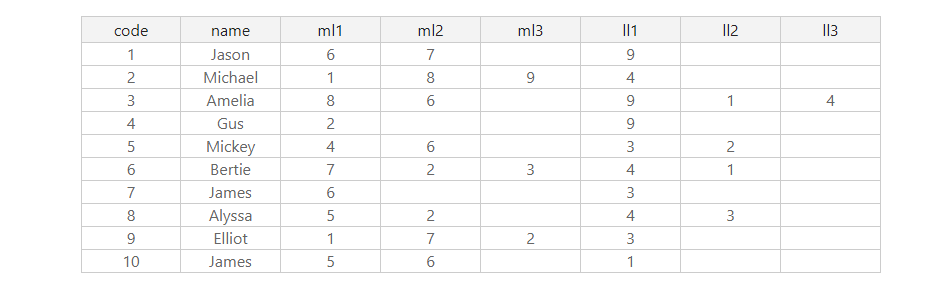
After entering the data, simply click on the Get Analysis button to generate your sociogram report as shown below
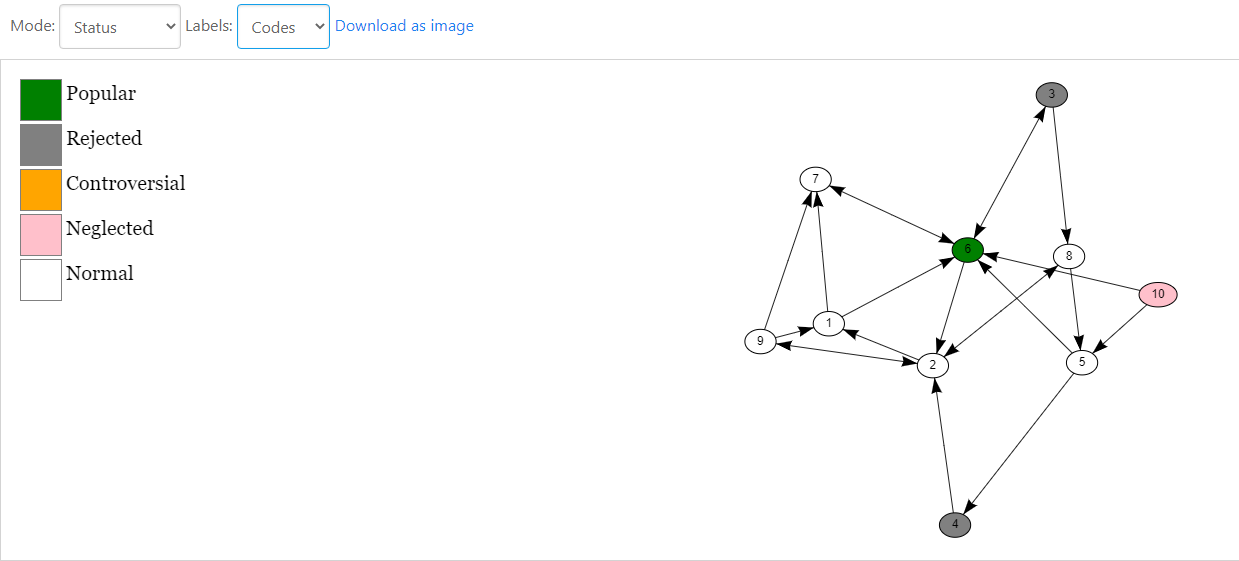
And that’s it! Within a few clicks, your sociogram report is ready to view and export, without the hassle of installing any tool or manually generating the sociogram yourself
Interpreting a Sociogram Report
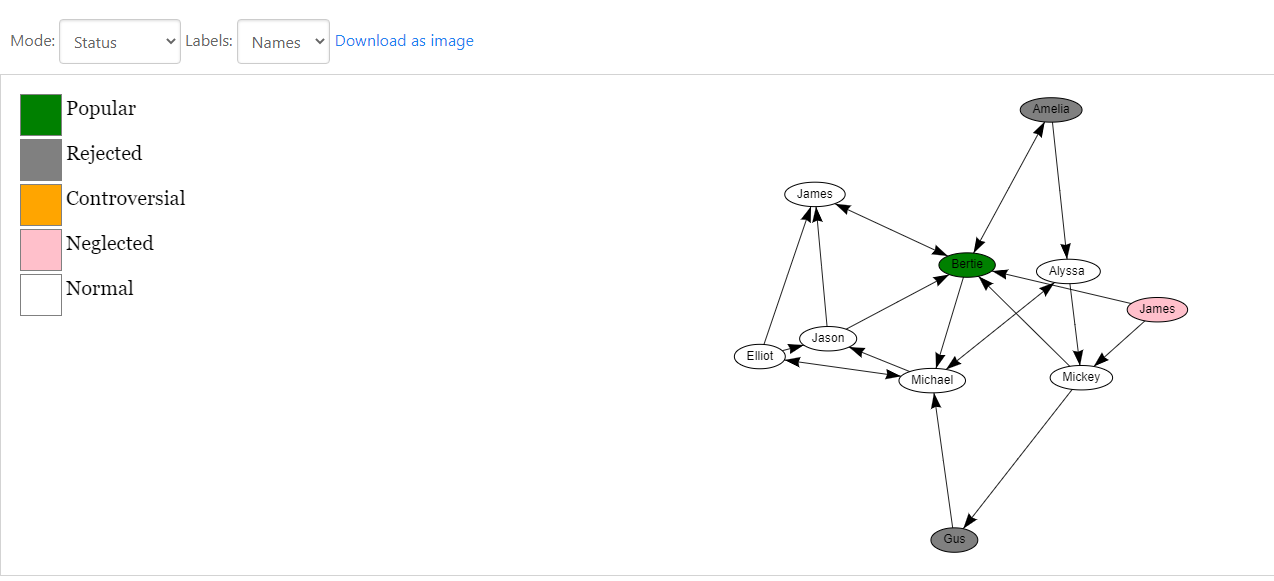
The main purpose of creating a Sociogram is to get some insights or valuable data from it. This data, if interpreted correctly, has the potential to make or break your group.
There’s no better way to learn something than to get involved with it and do it yourself, and that’s exactly what we’re gonna do. Let’s have a look at the sociogram we generated using the initially collected data
From the above sociogram, it’s clear that Bertie is popular among all of the people that took part in this survey. In sociogram terms, this would make her a Star since a lot of people consider her to be their friend.
The other outliers are James, Gus, and Amelia. The three of them are either Neglected ( not having people that are interested in them ) or Rejected ( having a lot of people that hate them )
These are the people that the Team Lead or a Class Teacher should focus on if they want to ensure that everyone in their team/group is performing at their best.
This might be a little hard to observe since it is your first sociogram report but if you look hard enough you can see that Jason, Elliot, and Michael are tightly bound to each other and form a close friend group. In Sociogram Terminology these people would be called Cliques
Conclusion
Congrats on coming this far and completing this tutorial on Creating Sociograms. Hopefully, this has helped you to understand the importance of sociograms in today’s society where people are starting to feel more neglected/left out than ever before. I’d highly recommend trying it out in your workplace/school/friend circle and you would be astonished at the insights you can form and conclusions that you can reach. If you liked this article and found it interesting, do share it with your friends!