
Creating a Web App with Backbone.js, Node.js, Express.js, Bootstrap, and MongoDB – TUTORIAL
Today we’ll be working with some of the most powerful & popular frameworks to build a Full Stack application. So here, we’ll be covering lots of stuff from Creating an Express API to learning how to Build User Interfaces using a popular frontend library Backbone.js. We’ll also be using MongoDB as the database for the Full Stack Application.
Sounds exciting? Let’s dive right in!
Table of Contents
Tech Stack for the Backbone.js WebApp
Before moving on to building the application, it’s a good idea to get to know more about the Tools and Frameworks we’ll be using.
Backbone.js
“Backbone.js is a Frontend framework which helps us in building web apps in a more structured way and helps us in writing cleaner and bug-free code.”
Don’t worry if you do not understand the above definition, let’s first try to understand what a Frontend framework is. To build a Web application, we need three things, an HTML file, a Javascript file, and something called a CSS file. Now Backbone.js simplifies the job by dividing the application into Models, Views, and Collections. This separates the UI part from the Logic and makes code handling and debugging easier.
The major difference between Backbone.js and frameworks such as React is that Backbone.js is much more lightweight and does not have all of the advanced features that React does (such as minifying the JavaScript/CSS, or installing additional packages/plugins using npm – node package manager)
Node.js & Express
Before moving ahead we need to understand what Node.js and Express are and what are the differences between them.
- Node.js to put it bluntly is a tool that helps us to create APIs by writing Javascript code
You might have a question now, “But if Node.js Can create API why do we even need Express?”.
True, you don’t even need Express to create API. You can very well create the whole API using just Node.js, but Express is a framework that simplifies the code that we need to write by a HUGE amount, for your information, Express is not the only framework available for Node.js there are tons of other frameworks too but Express is considered to be the standard and is the most-used framework for Node.js. It’s a very rare scenario to see someone make an API using just Node.js
Note: Since Node.js requires you to write Javascript, we recommend that you have a basic understanding of javascript to be able to grasp the concepts better.
MongoDB
For databases we’ll be using something called MongoDB, if you’ve heard of the traditional MySQL databases, you know how complex those can get when stuff like Joins gets involved, and since it’s a relational database, it’s hard to scale it further when the structure gets complicated. MongoDB simplifies databases and makes them easily scalable by making them in the form of BSON objects ( Similar to JSON (Javascript object notation ) ), and since we’re already working with Javascript, understanding & working with MongoDB should be a piece of cake
Bootstrap
Bootstrap is a Frontend Toolkit that helps us in quickly build UI components for web applications. Bootstrap has Pre-Built components such as Card, Button, Input, Dropdown, Modal, Toast, Tooltip, Carousel, and a lot more! These components can easily be included in the application with a few lines of code
It can be used with almost any framework (such as React.js, Vue.js, Angular) or can even be used with plain HTML/CSS/JS websites
What will we build in the Tutorial?
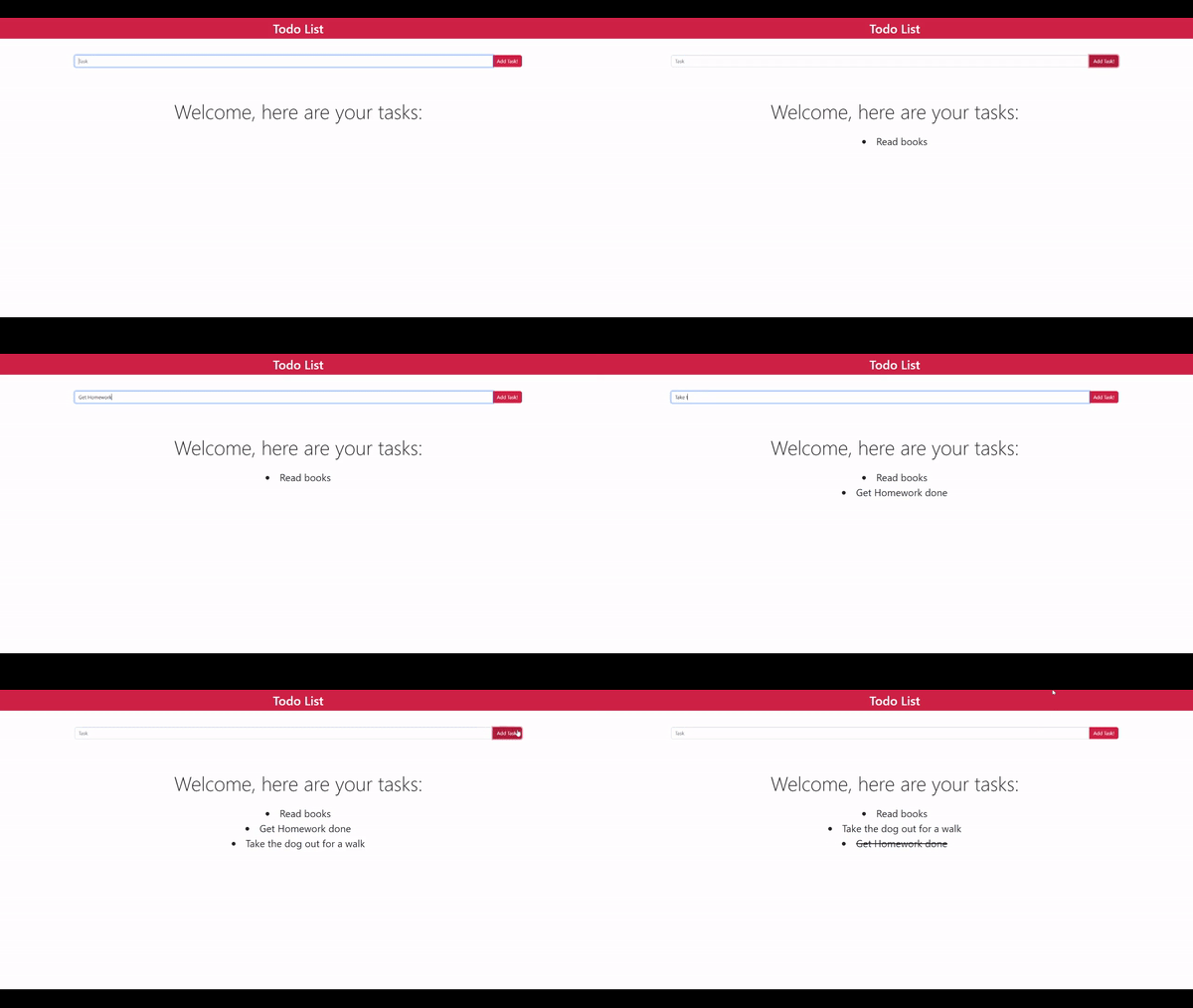
In this tutorial, we’ll build a simple to-do list application that allows us to create tasks and mark them as Completed. Also while syncing all of the functions to a MongoDB Database
Here’s what the final app will look like
Part 1: Setting up the MongoDB Database
As we have already discussed we’ll be using something called MongoDB, before moving ahead let’s dive deeper into how exactly MongoDB can help us and what are its Advantages and Disadvantages
Advantages and disadvantages of MongoDB
Advantages of MongoDB
- Scalability: When Working on MongoDB, one hardly ever needs to worry about scaling his application, as there’s something called Auto Sharding which means if the database ever gets too large for one server, it’ll automatically be Sharded so that multiple servers can use it without any change in the database
- Indexing: Since MongoDB uses something called BSON (Similar to JSON), it has lightning-fast query speeds as it can index fields for near-instant access.
- Easy Setup: MongoDB, when compared to other traditional databases, has a pretty simple setup, and they also provide additional tools such as MongoDB Compass which help to visualize the database better
- Support for Advanced Features: MongoDB, with features such as GridFS, and Replication, increases the type of data that can be made available inside the database by a huge amount
Disadvantages of MongoDB
The disadvantages of MongoDB are very few if none, but they are still important to discuss as they help you in getting to know the weak points of the database you’re working with
- High Memory Usage with so many advanced features such as Indexing the size of the database is sure to be more than a traditional database, however, this should not be a major problem for most of the users as we are constantly exceeding the data storage capacity year-by-year
- Cannot nest more than 100 Levels It’s highly unlikely that there is a structure that requires more than 100 levels of nesting, but hey, it’s still a limitation that other databases don’t seem to have
- Limited Document Size The document size in MongoDB is capped at 16 MB (we’ll discuss documents in detail, at a later point)
Creating the MongoDB database
- To create a MongoDB database the first step is to download MongoDB here
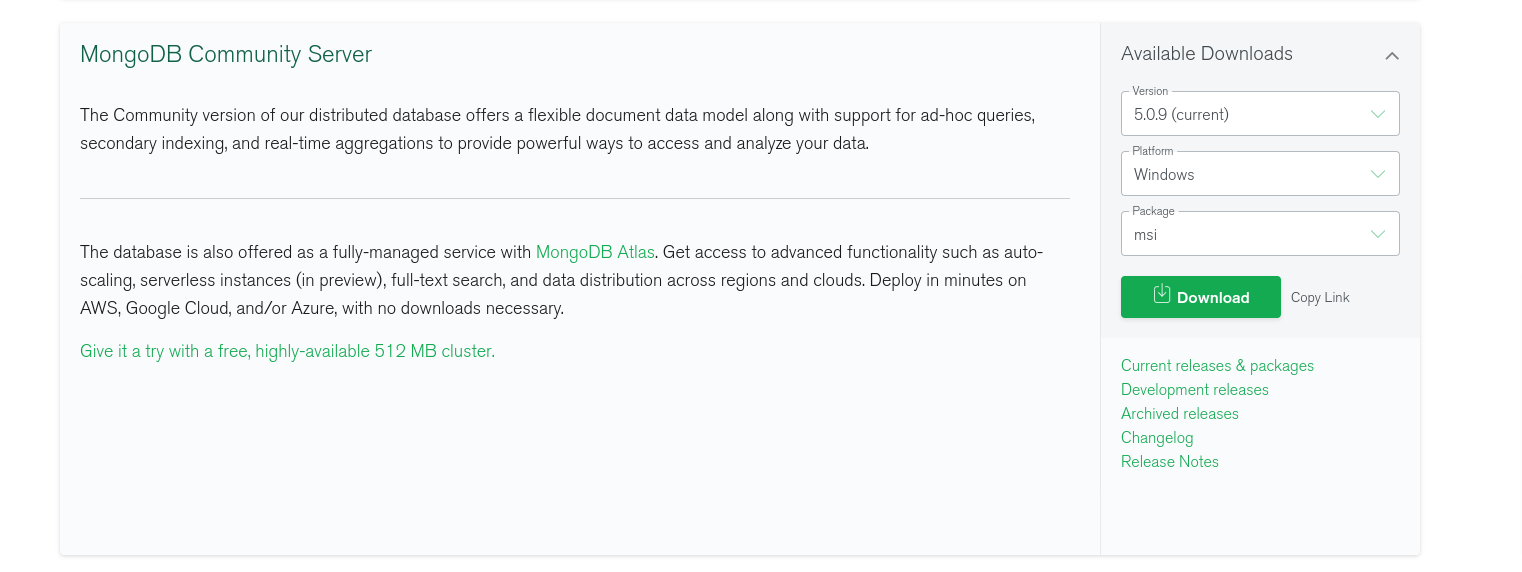
- Select the most current version and your platform (which would most likely be windows) and click on Download
- Install the program, and done! You are now ready to create your database
- Now that the program is installed, the essential files of the MongoDB program are located in the following directory
C:\Program Files\MongoDB\Server\<your mongodb version>\bin- You might see a lot of files, like mongo.exe, mongod.exe, mongos.exe,mongostat.exe, for our purposes the 2 main files are mongo.exe and mongod.exe
- mongod.exe is the main part of the server, it’s responsible for handling data requests, background tasks, managing data access, etc. Formally it’s called the Primary MongoDB Daemon. For us to be able to access the database this service must be running in the background
- mongo.exe is used to access the database and run operations on it using the Command Line, don’t worry about this as we’ll be learning to use an awesome easy-to-use tool to access the database, later in the article
- To start your MongoDB “Server” (do not get confused by the term server, a server is something that has one or more databases, for our purposes the server is simply our computer), click on the mongod.exe file, if you do not get any errors after running mongod.exe that means your database has started and is running in the background.
Tip: Whenever you need to start the database, instead of going to the above-mentioned folder over and over again, you can add it to Environment Variables so that it’s quick to access them whenever you need to start the Mongo Server. To do that, Search for Edit System Environment Variables and then Edit the PATH variable by adding our MongoDB\bin directory to it.
Accessing the MongoDB database
Now that we have created the server, there is a nice visual program that helps us to get its overview so that we can manage it easily. The best part of this is that MongoDB provides us with an Official tool called MongoDB Compass to visualize the database.
- The installation procedure for this should be pretty simple, you just need to select your platform, download the relevant file and click on it to install the program.
- After installation, it should look something like this:
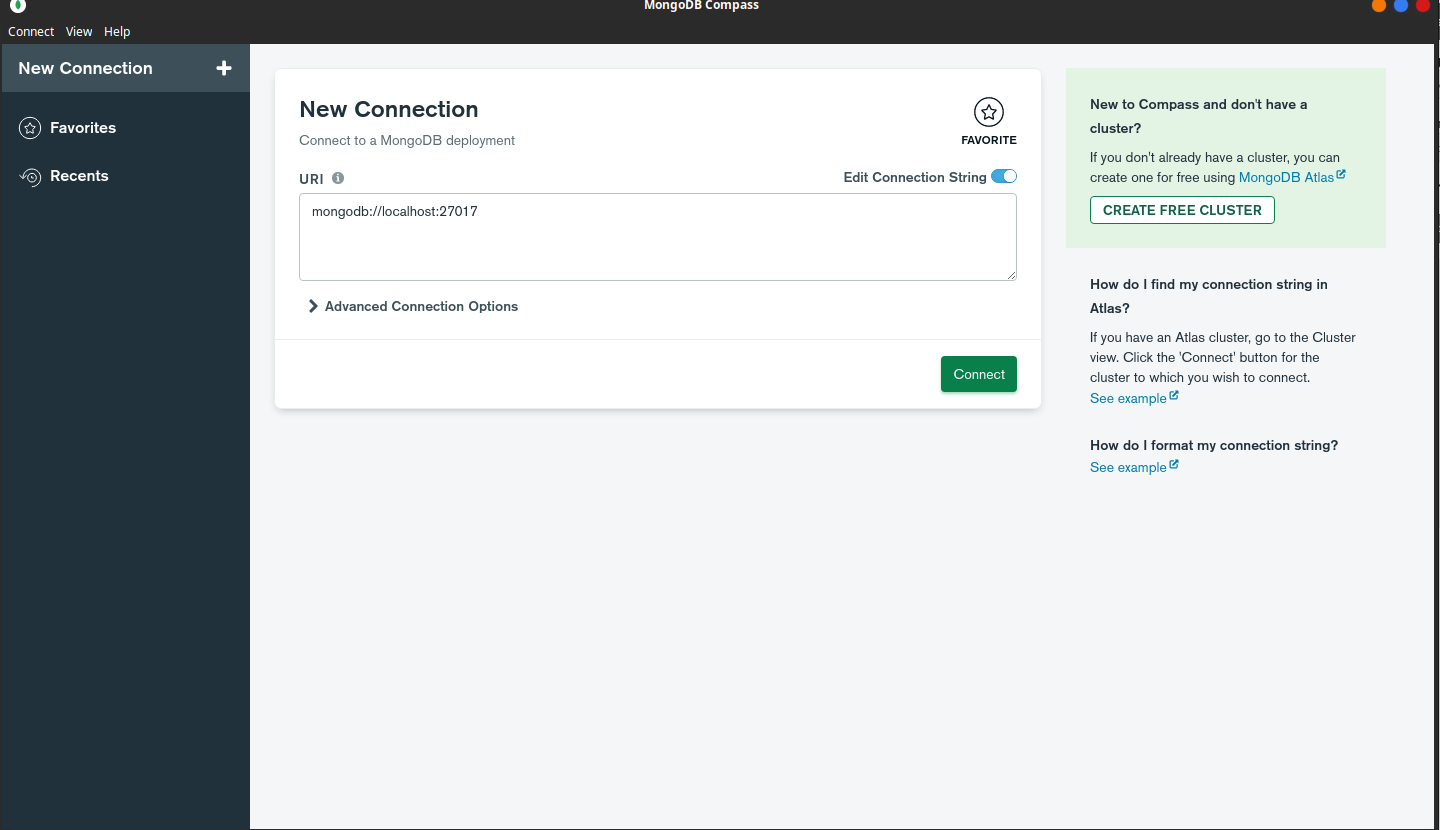
- While creating the server, it has something called MongoDB URI or MongoDB Connection String, which tells us the exact location of the server and how we can connect to it.
- An easy way to think about it would be to compare it with websites and/or files on a computer. Each of them has an address using which we can access them, similarly, the server has an address (usually starting with MongoDB://) to help us connect to it.
- Since we created the server on the computer, by default its URI is mongodb://localhost:27017
- Compass has already loaded the default address for us, so let’s go ahead and click on the Connect button.
- Now you see that the server is loaded, go to the Databases tab to list all of your databases, you’ll see 3 databases by default (admin, config, and local), they are used by MongoDB to store the details of the server, and are not meant to be used by us.
- Go ahead and click on Create Database, to create your database, for our purposes we’ll name the database as “app”.
- It might ask you two things, database name, and collection name, for now, name the database as the app and set the collection name as tasks, we’ll get into collections later on.
Understanding the structure of a MongoDB Server

You might be confused on what’s the difference between a server, database, collection, and all of that, to put it in the simplest way possible:
“There is a MongoDB Server, It has multiple databases, Those databases have multiple collections, and those collections, in turn, have multiple documents”
To understand this structure better, let’s try to fit all of the 4 elements into the API
- Server: for us, the server is the one we created when clicking on mongod.exe
- Database: we created the app database, which has all of the data required for the functioning of the application
- Collection: think of them as a table, with multiple columns, and rows. We created a collection named tasks which is a table, with columns of tasks, completed and rows representing the data
Tasks Collection
| Task | Completed |
| Finish the Assignment | false |
| Call John | true |
Now obviously for the app, the tasks table(or collection) is not the only thing we need, we would also maybe need to make another table for all of the users we have, etc, that’s why each database allows for us to create multiple tables (or collections)
- Documents: the last and the most basic part of a collection is a document, by now you can already guess what a document is and you would be right, a document is nothing but an entry in the table/collection, for eg. A document for tasks collection would be {task: “Call John”, completed: true} don’t focus on the syntax just yet, for now just try to get a grasp of what a document is.
Part 2: Working on the Node.js & Express API
Before we can start creating the API, we have to install the necessary tools
- An IDE (Integrated development environment) is a program where we can write code, it has advanced features such as syntax highlighting, error checking, etc which makes it convenient for developers.
There are many kinds of IDE available on the market like (Sublime text, Atom, Notepad++, IntelliJ Idea, etc) but for our purposes, we’ll use the most popular/recommended one called Visual Studio Code (which is also my personal favorite)
- Node.js to install Node.js is not a complicated task at all, just visit their website, download the latest stable version (16.16.0 LTS as of writing this article) and just follow the instructions on the installer and you should be good to go.
- Express since express.js is a framework of Node.js there’s no way to “install” it on your computer directly. Whenever installing a framework in a node.js app we have to install it in our project directory for every project in which we want to use Express.js. For now, it is enough that we have IDE and Node.js installed.
Setting up the files for the Node.js API
Since this is your first time setting up a Node.js project, you must understand what’s going on here, as you’ll have almost the same setup for all of your future Node & Express projects.
Steps
- Create a project folder and add your javascript file which will be the main file (the first and the only file that is run when you execute a Node.js program), in our case that would be app.js
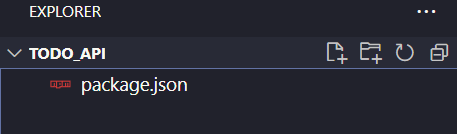
- For now, it’s just a normal folder with an app.js file, to make it a node project, run
npm init in your terminal, to open your terminal in VS Code using the following command Ctrl + Shift + ~
- You might be greeted with a window like this:
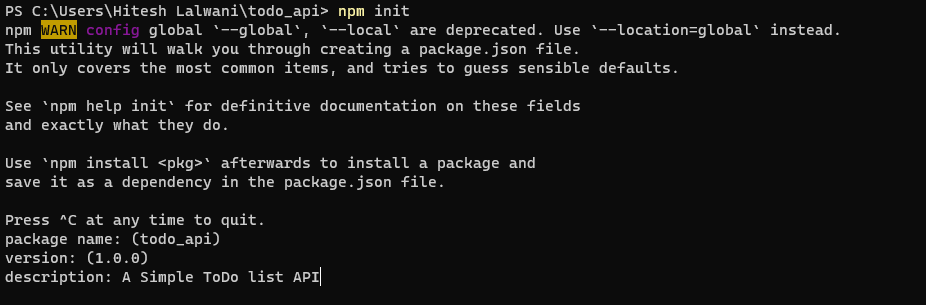
- Now you’ll be asked for details such as package name, etc. Fill those as instructed and your Node.js project is created!
Understanding the components of a Node.js project
You might have noticed that as soon as you created the project a few files appeared, out of them the only thing we care about is package.json, this file consists of all of the details of the project (including Project Name, Description, Version, the frameworks/packages we installed.. etc)
Installing Express
Now that we have the Node.js project created, it’s time for us to finally install Express.js, to install packages in a node.js project we use something called Nodejs Package Manager or NPM.
The syntax for installing Express.js or any other package available on npm is to simply run the following command in the terminal (remember you can always access the Visual Studio Code terminal by using the shortcut Ctrl + Shift + ~)
npm install expressInstalling MongoDB for Node.js
For the API to be able to interact with the MongoDB server, Node.js has a package called MongoDB, the installation procedure should be pretty similar to the one of Express.js
npm install mongodbThe installation process should only take a few seconds, and this equips you with all of the tools you need to finally write some code for your API
Creating the Node.js API
Let’s get started by importing the packages which we installed (express and MongoDB) so that we can access them in the app.js file
We do so by,
const express = require('express');
const mongodb = require('mongodb');
Here require(‘package-name’) is an inbuilt functionality that allows us to use the packages we installed through npm
Creating an express app is quite easy, simply calling the express() function returns the express app object
The code for the above looks like this:
const app = express();Hosting the Node.js API
For allowing access to the API we have to host it somewhere. To be clear, there is no difference between an API URL and a Normal Website URL. Both are just normal website addresses and can be accessed through the browser or somewhere else
By default whenever you create an express app, it has a default URL of localhost or 127.0.0.1
To host the API we also have to provide something called a PORT NUMBER, this number is not specific just for APIs, each website has a PORT, for eg. most “normal” websites have a port number of 80 or 443, it’s just that whenever we use a browser to access a website without providing a port number, it by default goes to port 443 or 80
Try it now: to visit a website with a port number just add: NUMBER at the end of the URL, for eg. https://google.com:443, should return the same page as https://google.com, because 443 is the default port number for most HTTPS websites
For the app, let’s just use the port number 8080, to do that
app.listen(8080, ()=> {
  console.log('app started');
});
Here, app.listen(PORT, callback_fn) takes two arguments, firstly the PORT Number and then the callback function, this function is “run/called-back” as soon as the app is started on port 8080
With this we have successfully started the app at port 8080, Now to start the node.js server, we simply have to run node app.js or node <main-file>.js.
If you see no errors then your API is successfully running on http://localhost:8080
Creating the Node.js API Routes
Now, if you visit the website URL ( http://localhost:8080 ) you will see the following
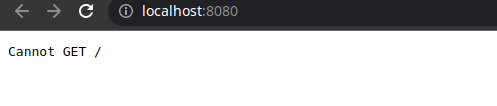
This is because the API doesn’t know how to handle requests yet, but hey, what do requests mean? In API terminology requesting is nothing more than just visiting the URL of the API, Let’s look at a few examples of API requests that we’ll be making
- http://localhost:8080/createTask?task=Sleep
- http://localhost:8080/markCompleted?task=Sleep
- http://localhost:8080/getTasks
If you observe closely you might see that after the port number and before the? we have some text starting with a / this is called the Page Route / Page Name This is to let the API know what operation we are performing (for eg, /getTasks tells the API that we have to perform the operation that gets all the tasks from the MongoDB database)
Now focusing on the content after the question mark (?), this is used to pass additional data to the API as required, for example when calling the page route /markCompleted we need to know the name of the task to mark it completed.
To pass data while visiting a URL we just add data in the following format after the question mark (?)
?property1=val1&prop2=val2&prop3=val3….
Now that we are clear on what API routes we will be working on let’s get started on each of them!
Connecting to the MongoDB Server
To work on the routes we have to get and update data from the database, so have to connect to the MongoDB server first, let’s do that as soon as we host the server (recall that as soon as an app.listen() is finished hosting the server, it calls the callback function) so that’s the best place to write the connection code.
app.listen(8080, ()=> {
const mongodbUri = 'mongodb://localhost:27017';
const client = new mongodb.MongoClient(mongodbUri);
client.connect().then((server) => {
 db = server.db('app');
});
});
Let’s have a look at what happens inside our app. listen() callback function
- First, we initialize our MongoClient by passing the URI of our database (recall Accessing the database section)
- Then we call client.connect() as soon as we get the server, we retrieve our ‘app’ database from the server by using DB = server.db(‘app’)
- The .then() above is a part of Javascript Promises, to learn more about them you can visit this excellent resource.
/addTask
For each of the API Routes, we will first have a look at the implementation and then try to understand its details
app.get("/addTask", async (req, res) => {
  const dataPassed = req.query;
  const task = dataPassed.task;
  await db.collection("tasks").insertOne({ task, completed: false });
  res.sendStatus(200);
});- Before looking at anything else let’s try to understand what app.get() does, app.get() is a function that takes two parameters, firstly the route name, and then the function to “call back” when someone visits that route, (this is similar to an app.listen(), where the callback function is called as soon as the API is hosted on the given port number)
- Let’s now look inside the callback function, firstly we get the task which the user passed (by using &property1=value1… format), a more formal way of saying this is to “get the Query Parameters which user has passed while visiting the URL”
- Inside the callback function, we get two objects, req, and res
- req contains the request data (such as Query parameters, Browser used to make the request, etc)
- res is used to send data back to the browser/device making the request
- After getting the data (name of the task) we use MongoDB’s insertOne() method to add a document ( a table entry ) into the tasks collection (the table)
- After doing that we let the browser know that everything was successful by sending a status code of 200 OK which means everything went OK, there are many such status codes such as 404, 500, etc you can read more about them here
/getTasks
app.get("/getTasks", async (req, res) => {
  let data = await db.collection("tasks").find().toArray();
  res.json(data);
});- This route is probably the simplest of all. The objective here is to return all the documents in the Tasks collection
- To do that, we simply call the find function without any arguments and convert the received response to an array of documents
- Then the received data is sent using the res.json() method provided by the response object

/markCompleted
app.get("/markCompleted", async (req, res) => {
  const dataPassed = req.query;
  const task = dataPassed.task;
  await db
    .collection("tasks")
    .updateOne({ task }, { $set: { completed: true } });
  res.sendStatus(200);
});- Almost everything is similar to the previous functions, but here we use the MongoDB function updateOne(), which takes in two parameters
- The first parameter describes the document (table entry) we want to update, in other words, before updating the task, MongoDB first has to find the document which has {“task” : task } where the task is the task name passed into the Query Parameters
- The second parameter describes how to update the found documents ( table entries ), here we update them by $set which means to set the “completed” property in the document found.
- Finally after doing that a status code of 200 ok is sent indicating that the request was processed successfully
You can now check if the update was successful by re-running the /getTasks route, and indeed if everything went alright you should see “completed” set to true indicating that the task was successfully marked completed

Part 3: Working on the Backbone.js Frontend
Now that the API of the application is up and running, it’s time for us to design the User Interface of the website, and for that, we’ll be using Backbone.js and Bootstrap
Understanding the Backbone.js file structure
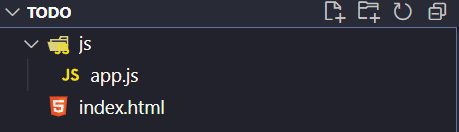
For frameworks such as Backbone.js and bootstrap, the file structure is not much different than a traditional HTML/CSS/JS project
The front-end is very simple and only consists of 2 files, index.html, and app.js. We do not have to worry about a CSS file as we’ll be using bootstrap for the styling of this application
Adding the Required Scripts & CSS – Backbone.js & Bootstrap
To include Backbone.js in the application
- Visit https://cdnjs.com/ and search for Backbone you will get the following result
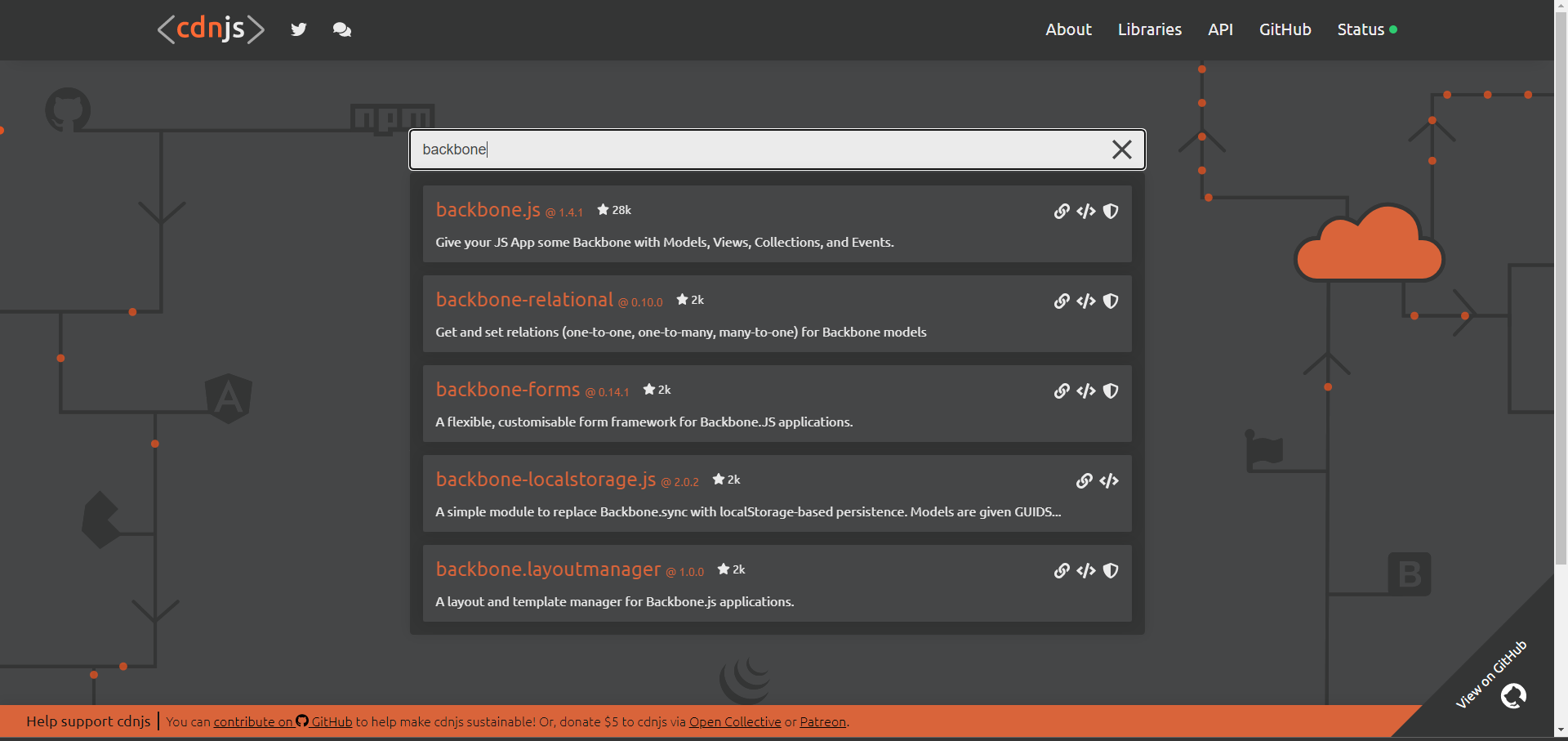
- Copy the <script> tag and paste it at the end of the <body> tag
- Similarly, do the same for jQuery and underscore.js as Backbone gets easier to use with these libraries
To install Bootstrap
- Visit their official website https://www.getbootstrap.com and scroll down to find the Include via CDN section
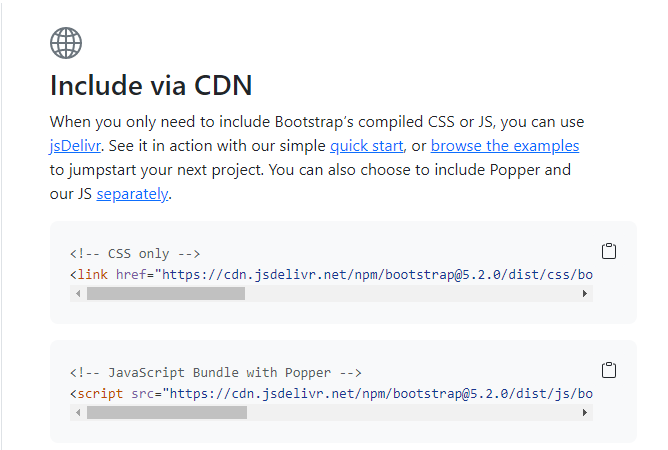
- Since we’ll be using Bootstrap mainly for CSS/Styling purposes it’s better to use the <!- – CSS only – – > version
Working on the HTML
After adding the scripts the HTML should now look something like this
<!DOCTYPE html>
<html lang="en">
  <head>
    <meta charset="UTF-8" />
    <meta http-equiv="X-UA-Compatible" content="IE=edge" />
    <meta name="viewport" content="width=device-width, initial-scale=1.0" />
    <!-- CSS only -->
    <link
      href="https://cdn.jsdelivr.net/npm/[email protected]/dist/css/bootstrap.min.css"
      rel="stylesheet"
      integrity="sha384-gH2yIJqKdNHPEq0n4Mqa/HGKIhSkIHeL5AyhkYV8i59U5AR6csBvApHHNl/vI1Bx"
      crossorigin="anonymous"
    />
    <title>Todo List</title>
  </head>
  <body>
      <script
      src="https://cdnjs.cloudflare.com/ajax/libs/jquery/3.6.0/jquery.min.js"
      referrerpolicy="no-referrer"
    ></script>
    <script src="https://cdnjs.cloudflare.com/ajax/libs/underscore.js/1.13.4/underscore-min.js"></script>
    <script src="https://cdnjs.cloudflare.com/ajax/libs/backbone.js/1.4.1/backbone-min.js"></script>
    <script src="js/app.js"></script>
  </body>
</html>
Taking a look at the final product, let’s add Title, Input Bar, and the Tasks Container to store all of the tasks
<div
      class="bg-danger h1 text-white d-flex flex-column justify-content-center align-items-center"
      style="height: 7vh"
    >
      Todo List
    </div>

    <div
      class="h1 text-white d-flex flex-column justify-content-center align-items-center"
      style="height: 15vh"
    >
      <div class="input-group mb-3" style="width: 75vw">
        <input
          type="text"
          class="form-control"
          placeholder="Task"
          id="task-inp"
        />
        <button class="btn btn-danger" type="button" id="addtask">
          Add Task!
        </button>
      </div>
    </div>

    <div
      class="display-3 d-flex flex-column justify-content-center align-items-center"
      style="height: 15vh"
    >
      Welcome, here are your tasks:
    </div>

    <div
      id="tasks"
      class="fs-2 d-flex flex-column justify-content-center align-items-center"
    >

    </div>
The above code should be pretty straightforward for the most part. If you are confused about bootstrap classes such as d-flex, display-3 a good idea would be to read their documentation where they provide clear instructions on all bootstrap classes also while comparing them with traditional CSS
Working on the JavaScript
In the app.js file, the first step would be to add the following code
$(document).ready(function () {

// we'll write the code here
});
This ensures that all of the JavaScript is executed only after the document is ready
In Backbone.js, the code usually consists of 2 parts
- Models
- Views
To put it simply, Models are responsible for Storing/Updating the data, whereas Views are responsible for displaying them.
Let’s get started by creating the TasksModel
let TasksModel = Backbone.Model.extend({
    initialize() {
      fetch("http://localhost:8080/getTasks")
        .then((data) => {
          return data.json();
        })
        .then((jsonData) => {
          this.set("tasksArray", jsonData);
          tasksView.render(this.get("tasksArray"));
        });
    },
    addTask(taskName) {
      let tasksArray = this.get("tasksArray");
      tasksArray.push({ task: taskName, completed: false });
      this.set("tasksArray", tasksArray);
      fetch("http://localhost:8080/addTask?task=" + taskName);

      tasksView.render(this.get("tasksArray"));
    },
    markTaskCompleted(taskName) {
      let tasksArray = this.get("tasksArray");
      for (let i = 0; i < tasksArray.length; i++) {
        if (tasksArray[i].task === taskName) {
          tasksArray[i].completed = true;
        }
      }
      fetch("http://localhost:8080/markCompleted?task=" + taskName);

      tasksView.render(this.get("tasksArray"));
    },
  });

tasksModel = new TasksModel();- Before understanding the above code, we must understand What Makes Up a Backbone Model. Simply, any Backbone Model consists of variables called properties that define the Model (in our case that would be tasksArray) and allows us to create several functions that modify these properties
- Moving to the code, as soon as a Backbone Model is created the first thing to happen is that the initialize() function is executed.
- Inside the initialize() function, we call the /getTasks route that we created in the previous section and then put the retrieved tasks to the tasksArray property by using this.set() method
- Similarly, in addTask() and markAsCompleted(), we call the respective API Routes that we created earlier
Now that the Model is ready, it’s time to create a TasksView that will display the data.
Before moving ahead, it’s important to understand How A Backbone View is Rendered. To render a Backbone.js view we first have to set its root element in the HTML (in our case that would be the tasks div)
In a Backbone.js View, we are provided with a render() function that gives us access to the current element in this.$el from where we can use standard jQuery/Javascript to modify the element
let TasksView = Backbone.View.extend({
    initialize() {
      this.render([]);
    },
    render(tasksArray) {
      this.$el.html("");
      for (let i = 0; i < tasksArray.length; i++) {
        if (tasksArray[i].completed === false) {
          let element = $(`<li>${tasksArray[i].task}</li>`);
          element.on("click", function () {
            tasksModel.markTaskCompleted(tasksArray[i].task);
          });
          element.hover(function () {
            $(this).css("cursor", "pointer");
          });

          element.appendTo("#tasks");
        }
      }

      for (let i = 0; i < tasksArray.length; i++) {
        if (tasksArray[i].completed === true) {
          let element = $(
            `<li class="text-decoration-line-through">${tasksArray[i].task}</li>`
          );
          element.hover(function () {
            $(this).css("cursor", "pointer");
          });
          element.appendTo("#tasks");
        }
      }
    },
  });
Let’s have a step-by-step understanding of the code above
- Firstly, in the initialize() function, we simply render the view with an empty array showing an empty screen in the tasks container
- The render() function takes in tasksArray and first resets the element’s HTML to an empty string
- Then we have 2 for loops, the first one for Incomplete Tasks and the second for Completed. This is done so that Completed Tasks are Crossed Out and shown at last
- Before appending the element to the Tasks div, we add a few event listeners
- The first event listener is the Hover Listener, this changes the Mouse Cursor to a Pointer ( The one that looks like a hand ) whenever the task is hovered upon
- For incomplete tasks, however, we need to add another Click Event Listener that calls the markTaskCompleted() function of the TaskModel, essentially Marking The Class as Completed
The only thing left now is to add an Event Listener to the “Add Task!” A button that simply calls the addTask() method of the TaskModel
To do that we add the following JQuery Code
  $("#addtask").click(function () {
    let val = $("#task-inp").val();
    $("#task-inp").val("");
    tasksModel.addTask(val);
  });
Conclusion
Congrats if you stuck around till the end of this long journey to build a Full Stack To-do List Application. Hopefully, you picked up lots of knowledge about a variety of frameworks that we explored today. You can try experimenting by adding stuff like React.js or using another database provider such as MySQL or PostgreSQL in the application. If you’d like to stick to the same tech stack, you can try implementing new features such as Adding Due Dates to tasks. If you learned something valuable today, do share this with your friends!